Binary Data In SOAP Web Service
Besides the text data type, web services is also able to handle the binary data type. With the ability to handle binary data, a web service is able to transfer image files to the client applications. What makes web service can transfer binary data is base64 encoding. Base64 can encode binary data into 64 characters (A to Z, a to z, 0 to 9, +, and /) so it can be included in SOAP document. What the client application need to do is just decode it back to binary data.
- Implementation In NuSOAP
-
For the implementation, we're going to create a web service with PHP using NuSOAP as the supporting libraries. This web service has one method which will return a struct containing the detail of a book including its cover. The detail of the book such as title, author, publisher, and price are in text format. And, the cover is in binary format because it is an image file.
Before creating the application code, please create this table first and insert it with some records.
And this is the code for the web service.
<?phpfunction getBookInfo($bookId){ mysql_connect("localhost","root",""); mysql_select_db("db1"); $result=mysql_query("SELECT * FROM book WHERE id='".mysql_escape_string($bookId)."'"); if($data=mysql_fetch_array($result)){ // The location of the image files $file="/var/www/webservices/images/".$data['cover']; // The image file should exist if(file_exists($file)){ $fh=fopen($file,"r"); $str=fread($fh, filesize($file)); fclose($fh); } else{ $str=""; } $book=array( "id"=>$data['id'], "title"=>$data['title'], "author"=>$data['author'], "publisher"=>$data['publisher'], "price"=>$data['price'], // Encode the file content to base64 "cover"=>base64_encode($str) ); } mysql_close(); return $book;}//Include the NuSOAP main filerequire("lib/nusoap.php");$server=new soap_server();$server->configureWSDL("Book","urn:BookService");// Define the struct data type$server->wsdl->addComplexType( "book", "complexType", "struct", "all", "", array( "id"=>array("name"=>"id","type"=>"xsd:string"), "title"=>array("name"=>"title","type"=>"xsd:string"), "author"=>array("name"=>"author","type"=>"xsd:string"), "publisher"=>array("name"=>"publisher","type"=>"xsd:string"), "price"=>array("name"=>"price","type"=>"xsd:long"), // Base64 as the data type "cover"=>array("name"=>"cover","type"=>"xsd:base64") ));// Registering the method$server->register( "getBookInfo", array("bookId"=>"xsd:string"), array("return"=>"tns:book"), "urn:BookService", "urn:BookService#getBookInfo");$HTTP_RAW_POST_DATA=isset($HTTP_RAW_POST_DATA)? $HTTP_RAW_POST_DATA : "";$server->service($HTTP_RAW_POST_DATA);?> - The Mobile Client Application
-
We have created the web service. Now, we will create a mobile application as the client. We will create it with Java and use Wingfoot SOAP as the supporting library.
Wingfoot SOAP came in ZIP file, so, you need to extract it first. After you extract it, you can copy the kvmwsoap_1.06.jar to the lib folder inside your project folder. By doing this, the Wingfoot SOAP library will be included in your project.
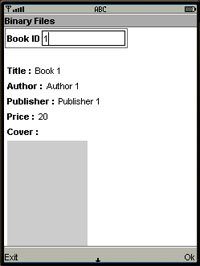
In this application, we just need to input the ID of book. If the ID was found, then the information of the book will be displayed including its cover. This is the code for our mobile application.
This is the screenshot of this mobile application when running.

Comments
Anonymous (not verified)
Tue, 07/19/2011 - 04:41
Permalink
Great
Thanks you very much.
can you help me a problem?
- I write a web service in php language to recevie image data from C# application client.
-How to convert base64 encode to image data again in C# application?
Thank for your help.
:)
Add new comment